


Multifunction LED Lighting Controller
OPPX Series
Full support for image inspection with multifunctionality and lighting brightness control
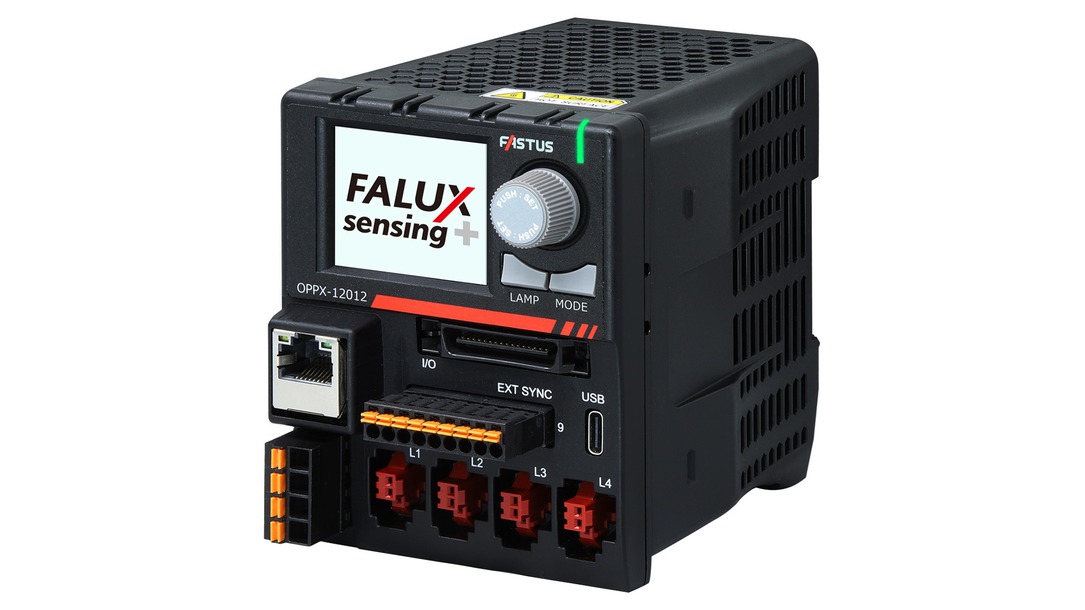

- Support for 12 V and 24 V input lighting
- Support for Mitsubishi Electric iQSS
- Recognition of individual lighting and monitoring/feedback by the new technology FALUX sensing +
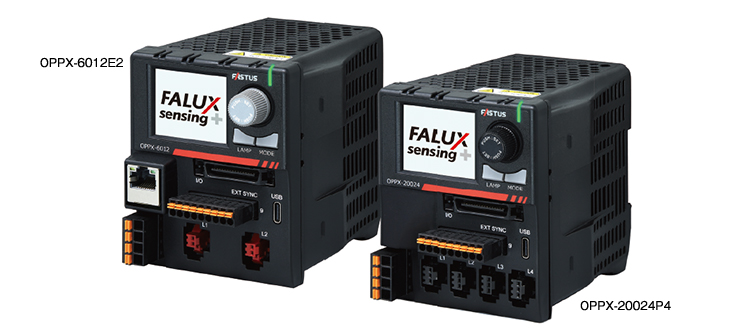
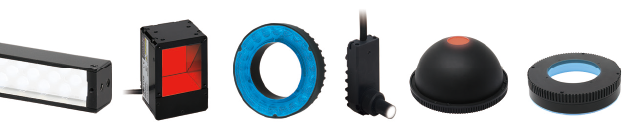
Various types of lighting can be connected, allowing for unification of controllers
Lineup of 12 VDC and 24 VDC output types
The OPPX Series supports both 12 V and 24 V input lighting, and also allows connecting other companies’ LED lighting units.
This enables controller unification even when using multiple types of lighting units, such as general-purpose lighting and line lighting.
And since communication standard unification is also possible, wiring reduction is achieved. In the case of OPPX-1601224P4/E4, both 12 and 24 VDC input lighting units can be connected using a single power supply unit.
Three light intensity modes supported by all models
All models in the OPPX Series support PWM intensity control used for general-purpose lighting units and voltage intensity control suitable for line lighting units.
They also support strobe overdrive that enables high-brightness lighting, so a single unit can handle various inspection applications.

-
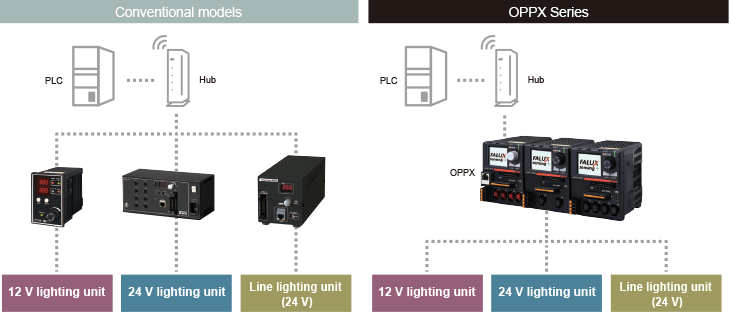
Control multiple line lighting units
Single-channel light intensity control products have been the mainstream for voltage intensity control power supplies used for line lighting unit.
Even if multiple lighting units were connected, the light intensity value and illumination timing could not be controlled separately.
The OPPX Series allows setting the light intensity value and illumination timing for each lighting unit, enabling control with a single controller (maximum capacity: 200 W) even when using lighting units in multiple inspection processes. -
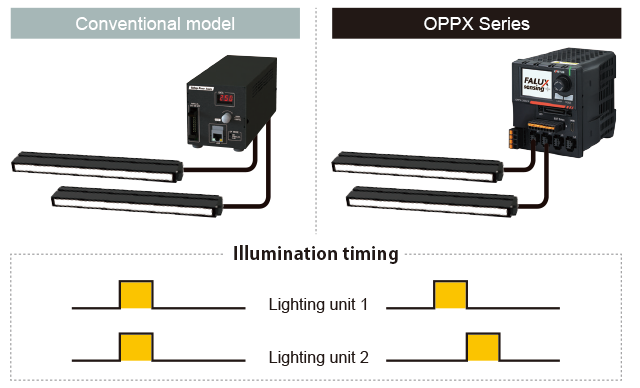
Compact case with easy-to-read LCD and fully functional controller panel
-
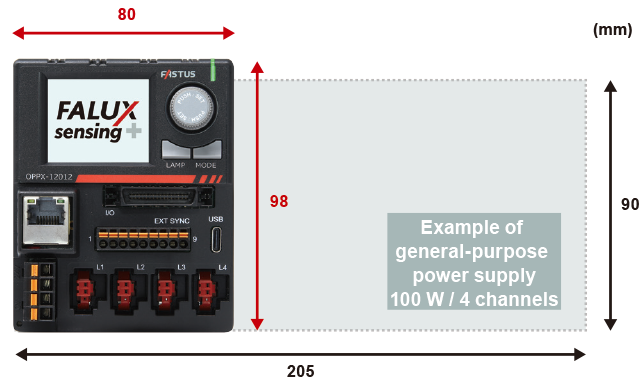
Compact size yet large capacity
High capacity in a compact size is achieved through high-density mounting technology and optimal heat dissipation design.
Since its height is equivalent to that of the majority of PLCs (100 mm), it can be easily installed inside a panel. -
-
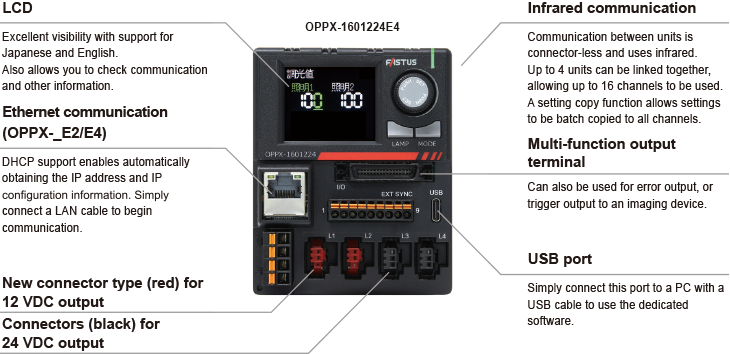
Fully functional controller panel
-
Also connects to existing lighting series (12 VDC specification)
The OPPX Series employs the new SM connector type.
These connectors are for lighting that supports FALUX sensing +, but also allow you to connect existing lighting series (12 VDC specification, SM 2-pin connectors). -
 Optex FA’s original FALUX sensing technology developed since 2010 has evolved Total brightness control can now be achieved through recognition of individual lighting units
-
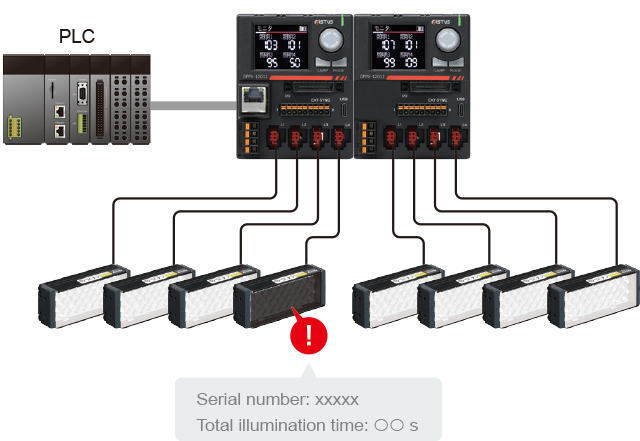
Serial numbers and total illumination time can be viewed
The OPPX Series is equipped with the new technology FALUX sensing +.
Connecting lighting units that support FALUX sensing + enables recognition of individual lighting units in addition to monitoring and feedback control.
Data such as total illumination time, which differs for each individual lighting unit, can be viewed and then used for predictive maintenance.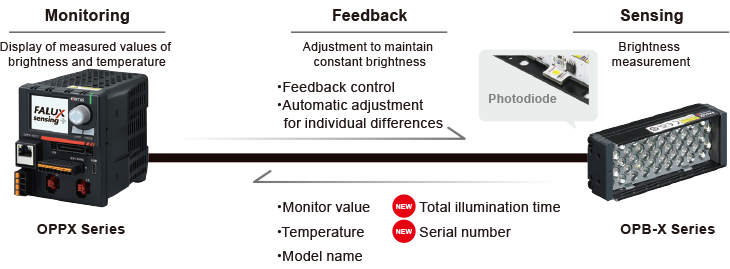
Main functions
-
Monitoring
The photodiode inside the lighting unit receives the light from the lighting unit itself and displays the brightness and temperature as the monitor value on the controller.
Viewable items
- Light intensity value
- Internal temperature
- Monitor value (brightness)
- Model name
- LAMP intensity correction value
- Serial number*
- Temperature
- Total illumination time*
Monitor brightness alarm
An alarm can be output when the monitor value exceeds the threshold set for the upper/lower alarm limit.
Automatic adjustment for individual differences
By setting the same absolute brightness value among all lighting units, light with the same brightness can be emitted without individual differences. Automatic or manual adjustment can be selected, and the brightness is adjusted by changing the light intensity value.
-
Feedback
If the brightness is reduced due to a voltage drop caused by cable extension or LED degradation, the output voltage is automatically corrected to maintain the brightness at the time of factory shipment.
The offset value can be checked with the “Light intensity correction value”.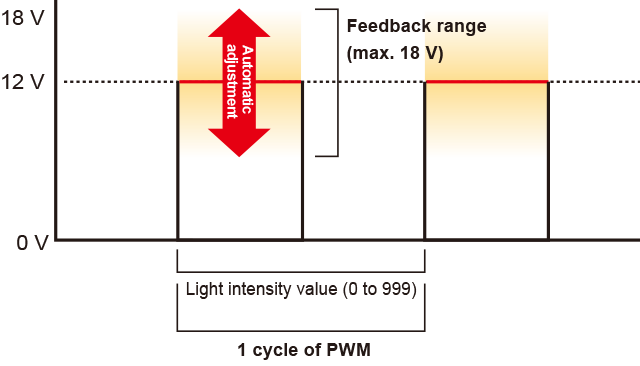
Items with * can be checked only when connected with a lighting unit that supports FALUX sensing +.
Example of using FALUX sensing +: Individual lighting control
-
The following items can be acquired when connected with a lighting unit that supports FALUX sensing +.
- Serial number
- Total illumination time
Since the information is saved in the lighting unit, it can also be checked when connected to another OPPX.
Even if lighting units are swapped between equipment or new lighting units are added, which lighting units are currently connected can be checked from the host PLC and utilized for equipment management.
-
New light intensity mode L-INT prevents a decrease in brightness caused by a voltage drop due to a cable
When a lighting extension cable is used, there will be a decrease in lighting brightness caused by the voltage drop effect due to the cable.
L-INT mode, a new light intensity mode, has been developed and incorporated into the OPPX Series to solve this issue.
L-INT is a original light intensity mode to change brightness inside lighting units that support FALUX sensing +.
-
Previous issue
Even if the same light intensity value was set on previous controllers, differences in lighting brightness would occur due to differences in cable length.
-
When using voltage intensity control mode of OPPX
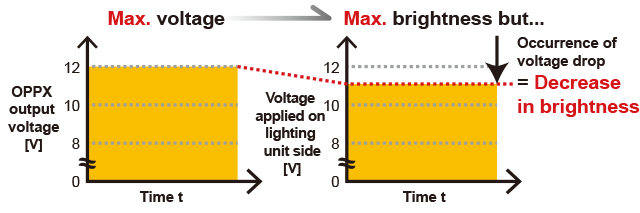
The brightness of the lighting unit is changed in proportion to the output voltage of the power supply. For OPPX with the 12 VDC output specification, the output voltage is adjusted from 8 to 12 VDC in 1,000 steps.
When an extension cable is used, brightness decreases because the voltage actually applied to the lighting unit decreases compared with the output voltage of OPPX. -
-
Solution implemented by new light intensity mode L-INT
L-INT provides a solution to the voltage drop effect caused by a cable.
This enables illumination at the same brightness even when the cable length differs due to the way cables are routed inside the equipment.
-
When using the L-INT mode
Unlike with the voltage intensity control mode, the output voltage from the power supply is fixed to the maximum value regardless of the light intensity value.
For OPPX with the 12 VDC output specification, the output voltage is fixed to 12 VDC, and the voltage is controlled inside the lighting unit so that a current flows to the LED according to the light intensity value set using the dedicated line communication of FALUX sensing +. This enables reducing the decrease in brightness caused by a voltage drop due to an extension cable. -
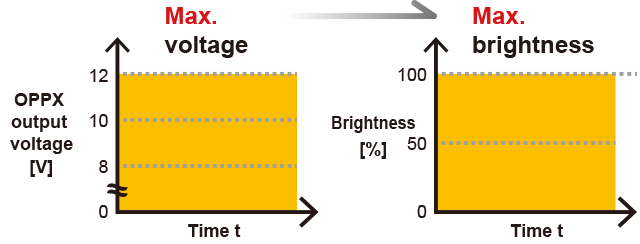
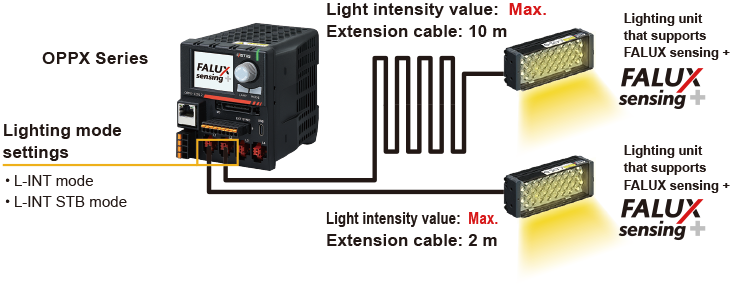
Reduction in the decrease in brightness caused by a voltage drop due to an extension cable
-
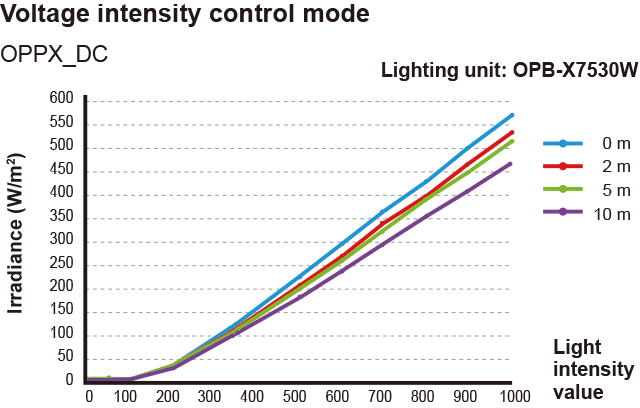
The voltage drop caused by the cable affects the lighting unit, causing the brightness to decrease.
Since the level of a voltage drop differs depending on the cable length, the brightness also differs. -
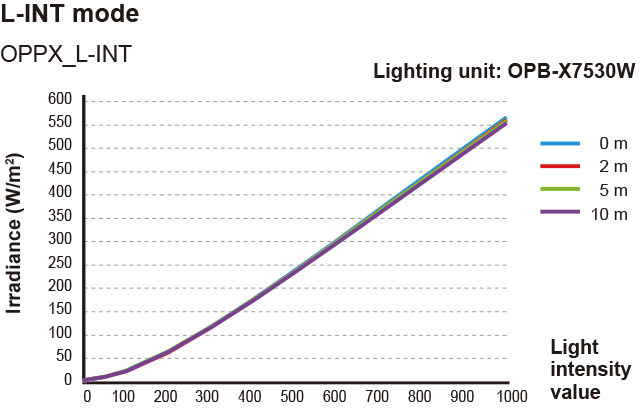
Even if there is any voltage drop due to cables, the voltage is controlled inside the lighting unit, so any differences in voltage drop due to cable length is alleviated to achieve stable brightness.
Functions to reduce the amount of work required for lighting control
-
External synchronization input assignment function
This function allows you to flexibly assign and change the output points with respect to the input points of the controller.
A single input can synchronize multiple lighting units, reducing the number of wires required.
Furthermore, assignments can be changed even after wiring.Setting example
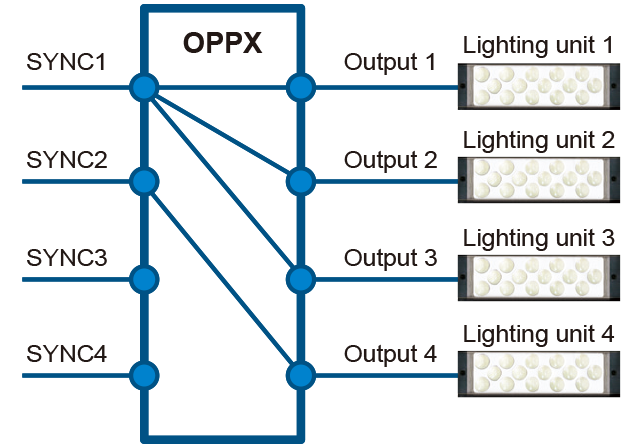
-
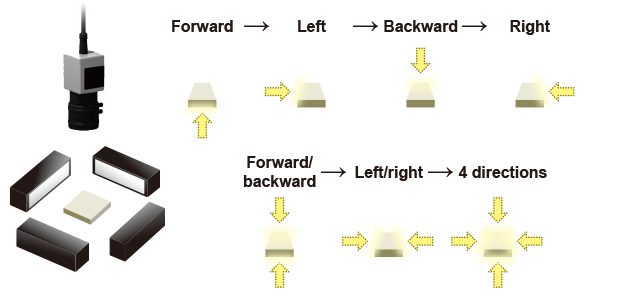
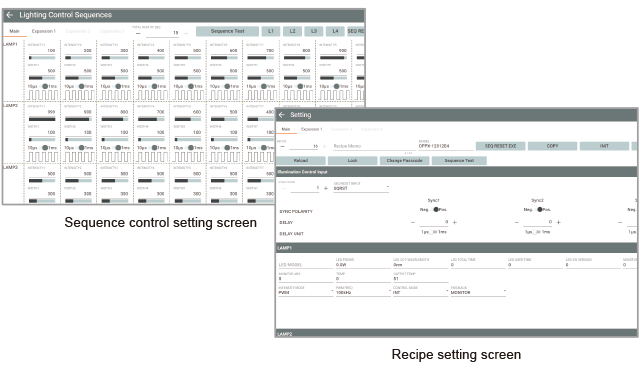
Sequence control
By presetting an illumination pattern for synchronization input, you can reproduce the illumination pattern with just one synchronization input.
This shortens the setup time since automatic switching is performed by only external synchronization input.
Up to 16 illumination patterns (light intensity value and illumination time) can be registered.Sequence registration example
(illumination pattern to illuminate a workpiece from four directions)
-
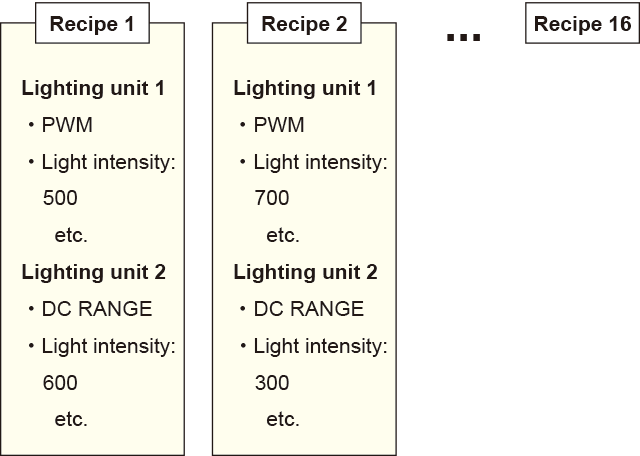
Recipe function
Save up to 16 illumination related settings such as the following as a recipe.
- Illumination conditions (light intensity value, illumination time, synchronization delay time, etc.)
- Sequence control settings (number of times, illumination pattern)
- Input assignment and input polarity for external synchronization control
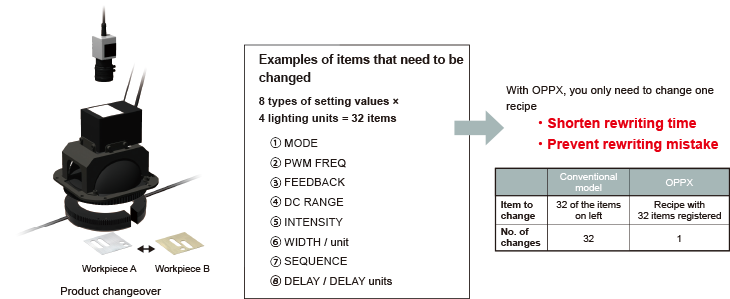
Switching can be done quickly and easily without missing any changes as all related setting values can be switched.
In addition, a backup file can be made of all settings including a recipe. The backup file can be used not just for recovery but also when adding a production line. -
-
Example: Simplifying setting changes during product changeover
Easy setup with PC software
-
PC software designed specifically for the OPPX Series is available.
It allows you to easily configure light intensity and synchronization control, frequency, and other settings.
The software can be downloaded free of charge from the website.
-
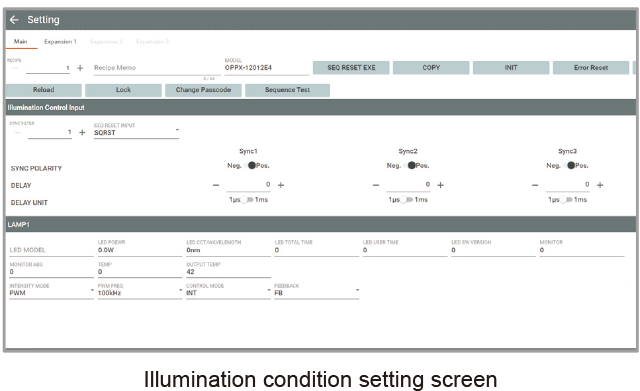
Intuitive interface
Optex FA developed an interface to allow you to view light intensity and synchronization control settings at a glance. Setting values are easy to configure, with both selection from a pull-down menu and direct input supported.
-
-
Configurable items
- PWM frequency
- External synchronization
input selection - Light intensity value /
lighting width - Synchronization delay
time - External synchronization
input assignment - Sequence control
- Recipe settings
- Feedback ON/OFF
- Absolute brightness
control ON/OFF
-
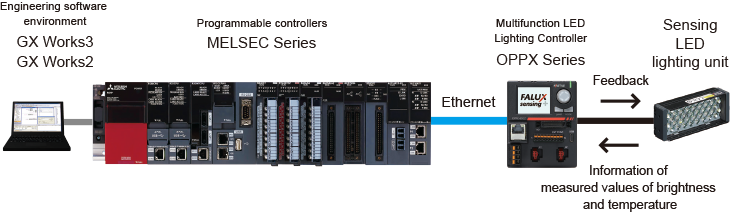
Support for Mitsubishi Electric iQ Sensor Solution ( )
)
The OPPX Series can be operated on a network using Mitsubishi Electric GX Works2 and GX Works3.
By connecting and coordinating lighting units and power supplies for image processing, programmable controllers, displays, and other control devices, you can manage them all at once, which can be expected to bring improvements in work efficiency.
Contact Us
Our experts quickly deliver the best plan for your needs and provide continuous support throughout the process.
- Download List
- 20